SSR framework for Svelte 5 + Bun with islands-based selective hydration
On this page
Send transactional mail — password resets, verification links, notifications — with Mochi.email(). Configure a transport once under Mochi.serve({ email }), then send from anywhere on the server: a page action, an API route, or a queue job.
import { Mochi } from 'mochi-framework';

await Mochi.serve({
  routes: {/* … */},
  email: {
    from: 'noreply@acme.dev',
    transport: { type: 'smtp', host: 'smtp.acme.dev', port: 587, auth: { user, pass } },
  },
});

// from an action, API handler, or queue job:
await Mochi.email({
  to: 'alice@example.com',
  subject: 'Reset your password',
  html: '<p>Click <a href="…">here</a> to reset.</p>',
});The message
Envelope fields, plus the body:
await Mochi.email({
  to: 'alice@example.com', // string or string[]
  from: 'noreply@acme.dev', // optional — falls back to email.from
  cc,
  bcc,
  replyTo,
  subject: 'Welcome',
  component: './src/emails/Welcome.svelte', // the body — see "The body"
  props: { name: 'Alice' },
  attachments: [{ filename: 'invoice.pdf', content: bytes }],
  headers: { 'X-Entity': 'signup' },
});
Mochi.email() resolves the body, fills from from email.from, normalizes recipients, sends, and resolves to a MochiEmailResult ({ transport, messageId?, accepted?, rejected? }).
Any address field accepts a display name in the standard Name <addr> form:
await Mochi.email({ from: 'Acme <noreply@acme.dev>', to: 'Alice <alice@example.com>', subject, text });The body
A message has two parts:
- The HTML part — an
htmlstring or acomponent(a Svelte template rendered to inlined HTML). If you pass both,componentwins. - The text part — the
textstring. Mochi derives it from the HTML when you omit it, so the message stays multipart.
// HTML + your own plain-text alternative (recommended):
await Mochi.email({ to, subject, html: '<h1>Hi</h1>', text: 'Hi' });

// A Svelte component + your own plain-text alternative:
await Mochi.email({ to, subject, component: './src/emails/Welcome.svelte', props: { name: 'Alice' }, text: 'Welcome, Alice' });

// HTML only — Mochi derives the text part:
await Mochi.email({ to, subject, html: '<h1>Hi</h1>' });

// Plain-text only:
await Mochi.email({ to, subject, text: 'Hi' });
Supply text yourself when you can. The auto-derived fallback strips tags from your HTML, so a hand-written version usually reads better.
Transports
Set email.transport to one of four shapes. Omit it for the environment default: dev in development, log in production.
SMTP — delivers over SMTP through nodemailer:
email: {
  from: 'noreply@acme.dev',
  transport: {
    type: 'smtp',
    host: 'smtp.acme.dev',
    port: 587,            // default 465 when secure, else 587
    secure: false,       // default: port === 465
    auth: { user: '…', pass: '…' },
    pool: true,
  },
}
Custom — an escape hatch for any HTTP email API (Resend, SES, Postmark) with no SDK. Receives the resolved message. No SMTP library is loaded:
email: {
  from: 'noreply@acme.dev',
  transport: {
    type: 'custom',
    send: async (msg) => {
      const res = await fetch('https://api.resend.com/emails', {
        method: 'POST',
        headers: { Authorization: `Bearer ${process.env.RESEND_KEY}`, 'Content-Type': 'application/json' },
        body: JSON.stringify({ from: msg.from, to: msg.to, subject: msg.subject, html: msg.html }),
      });
      const { id } = await res.json();
      return { messageId: id };
    },
  },
}
Dev (default in development) — captures each message into an in-memory outbox you can browse. Set it explicitly with { type: 'dev' }.
Log (default in production) — logs a one-line summary. Set it explicitly with { type: 'log' }.
The dev outbox
The dev transport stores each message in the dev-server process and serves a viewer at /_mochi/email. The viewer renders the HTML in a sandboxed iframe, plus the plain-text part, the raw source, recipients, headers, and attachments. When the dev transport is active, an envelope icon in the debug bar links to it.
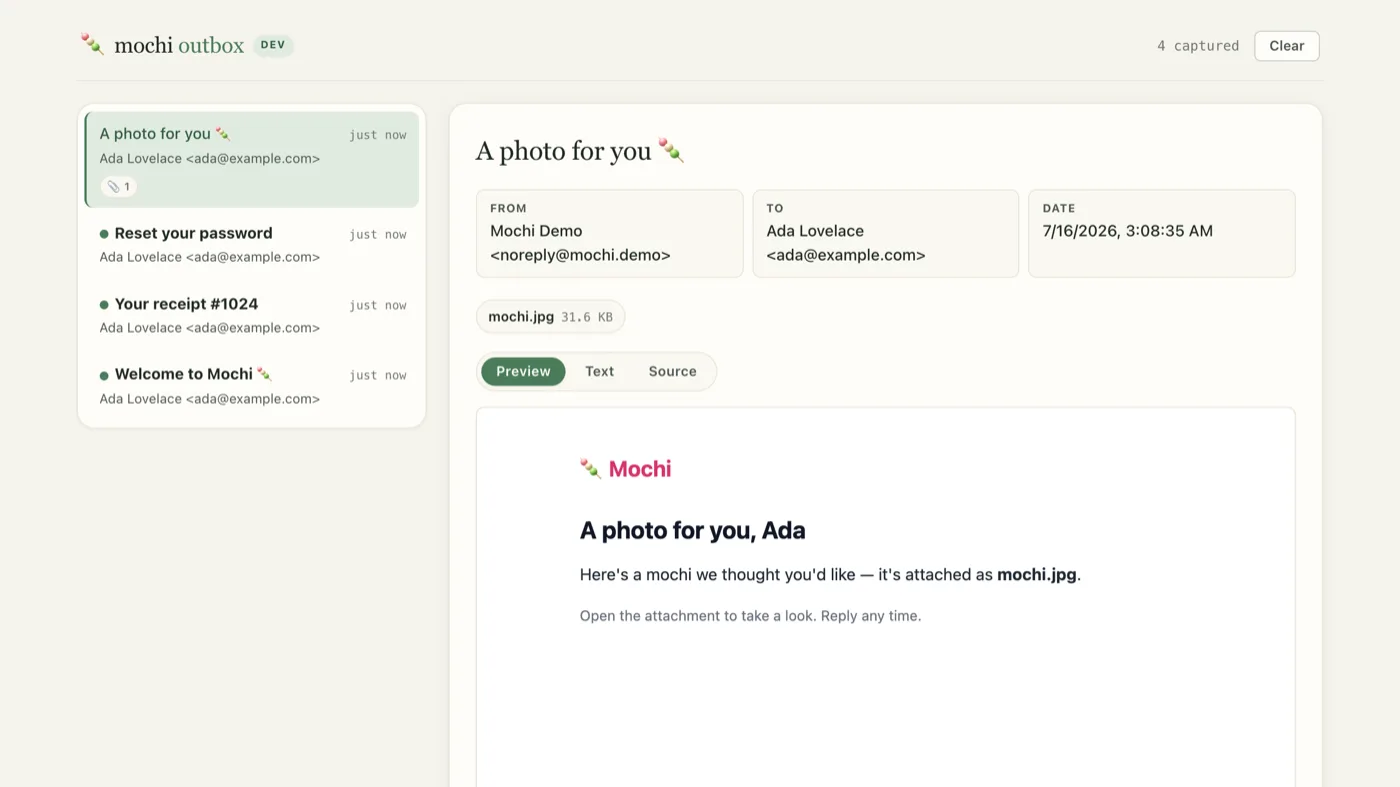
Preview / Text / Source tabs switch between the rendered HTML, the plain-text alternative, and the raw source.Leaving transport unset gives you the dev/log split automatically. To pick the transport by hand, branch on NODE_ENV — this options object is evaluated before Mochi.serve() resolves isDev, so read the env var directly here:
await Mochi.serve({
  routes: {/* … */},
  email: {
    from: 'noreply@acme.dev',
    transport: process.env.NODE_ENV === 'production' ? { type: 'smtp', host: 'smtp.acme.dev', port: 587, auth: { user, pass } } : { type: 'dev' },
  },
});
Svelte templates
Author a body as a Svelte component. Pass its path as component (like Mochi.page()) plus props. Mochi renders it and inlines its scoped CSS into style="" attributes (via css-inline) for email-client compatibility.
Keep templates in src/emails/. mochi-framework build walks that directory and compiles every .svelte under it into the manifest, so production sends need neither the compiler nor your Svelte sources.
<!-- ./src/emails/Welcome.svelte -->
<script lang="ts">
  let { name }: { name: string } = $props();
</script>

<div class="card"><h1>Welcome, {name}</h1></div>

<style>
  .card {
    padding: 24px;
  }
  h1 {
    color: #6b46c1;
  }
</style>
await Mochi.email({
to: 'alice@example.com',
subject: 'Welcome to Acme',
component: './src/emails/Welcome.svelte',
props: { name: 'Alice' },
});Sending in the background
Delivery is slow and can fail. Offload the send to a Mochi.queue() so the action returns immediately and a background worker runs Mochi.email() with retries.
// jobs.server.ts
import { Mochi } from 'mochi-framework';

export const emailQueue = Mochi.queue<{ to: string; name: string }>('emails', {
  concurrency: 5,
  retryLimit: 2,
  process: async (job) => {
    await Mochi.email({
      to: job.data.to,
      subject: 'Welcome to Acme',
      component: './src/emails/Welcome.svelte',
      props: { name: job.data.name },
    });
  },
});Intercepting messages
The email:message filter runs on the fully-resolved message right before the transport. It can rewrite the message (audit BCC, List-Unsubscribe headers, a staging catch-all) or return null to suppress the send. Prefer it over a custom transport when you only need to touch the message.
await Mochi.serve({
  filters: {
    'email:message': (message) => ({ ...message, bcc: [...(message.bcc ?? []), 'audit@app.dev'] }),
  },
  routes,
});
Observability
Each send emits email:sent ({ to, subject, transport, messageId?, duration }). Failures emit email:error ({ to, subject, transport, error }). A send vetoed by the email:message filter emits email:sent with transport: 'suppressed'. consoleLogger() formats them as MAIL lines. Successful deliveries log at info. The two “did not deliver” cases — the log transport and any email:error — log at warn.
Keeping recipients and subjects out of logs
MAIL lines print recipients and the subject. Both are PII, so email.filterPii defaults to true in production (redacted) and false in development. Set it explicitly to override:
await Mochi.serve({
  email: {
    from: 'noreply@acme.dev',
    transport: { type: 'smtp', host: 'smtp.acme.dev', port: 587, auth: { user, pass } },
    filterPii: true, // redact recipients + subject from MAIL log lines
  },
  routes,
});
The transport, error, and duration are still logged, so the lines stay useful. filterPii affects consoleLogger() output only. The email:sent / email:error events still carry the real to and subject, so your own mochiEvents subscribers get the full values.