SSR framework for Svelte 5 + Bun with islands-based selective hydration
July 21, 2026
Mochi 0.8.0
Mochi 0.8.0 is out — bringing 93 commits since 0.7.0 — the biggest release so far. The main features in this release are:
- Image transformations
- Email sending
- Queues
- Form captcha
- Rate limiting
- Client-only components
- Debug bar improvements
- Other improvements
- Looking ahead
- Install or upgrade
Image transformations
Mochi now supports runtime image transformations. Images are also automatically cached. Both Vite-style imports and external servers are supported for fetching images. We also get a new <Image /> component for responsive images.
await Mochi.serve({
  image: {
    sizes: {
      thumbnail: { width: 200, height: 200, fit: 'inside', format: 'webp', quality: 80 },
    },
  },
  // …
});
Then reference the size by name wherever you need it — the source is either a Vite-style import or a remote URL:
<script>
  import { Image } from 'mochi-framework/image';
  import photo from './photo.jpg';
</script>

<Image src={photo} size="thumbnail" alt="A resized photo" />
<Image src="https://example.com/photo.jpg" size="thumbnail" alt="A resized remote photo" />
Every tile below is the same kind of source photo run through a different named size declared on this site:


Email sending
Mochi.email() brings first-class support for sending emails via Mochi. After configuring an email transport in Mochi.serve(), you can send emails from a page action, an API route or even a queue job. Making templates is a breeze thanks to the built-in support for using Svelte components as email templates, with automatic CSS inlining.
await Mochi.email({
  to: 'alice@example.com',
  subject: 'Reset your password',
  html: '<p>Click <a href="…">here</a> to reset.</p>',
});
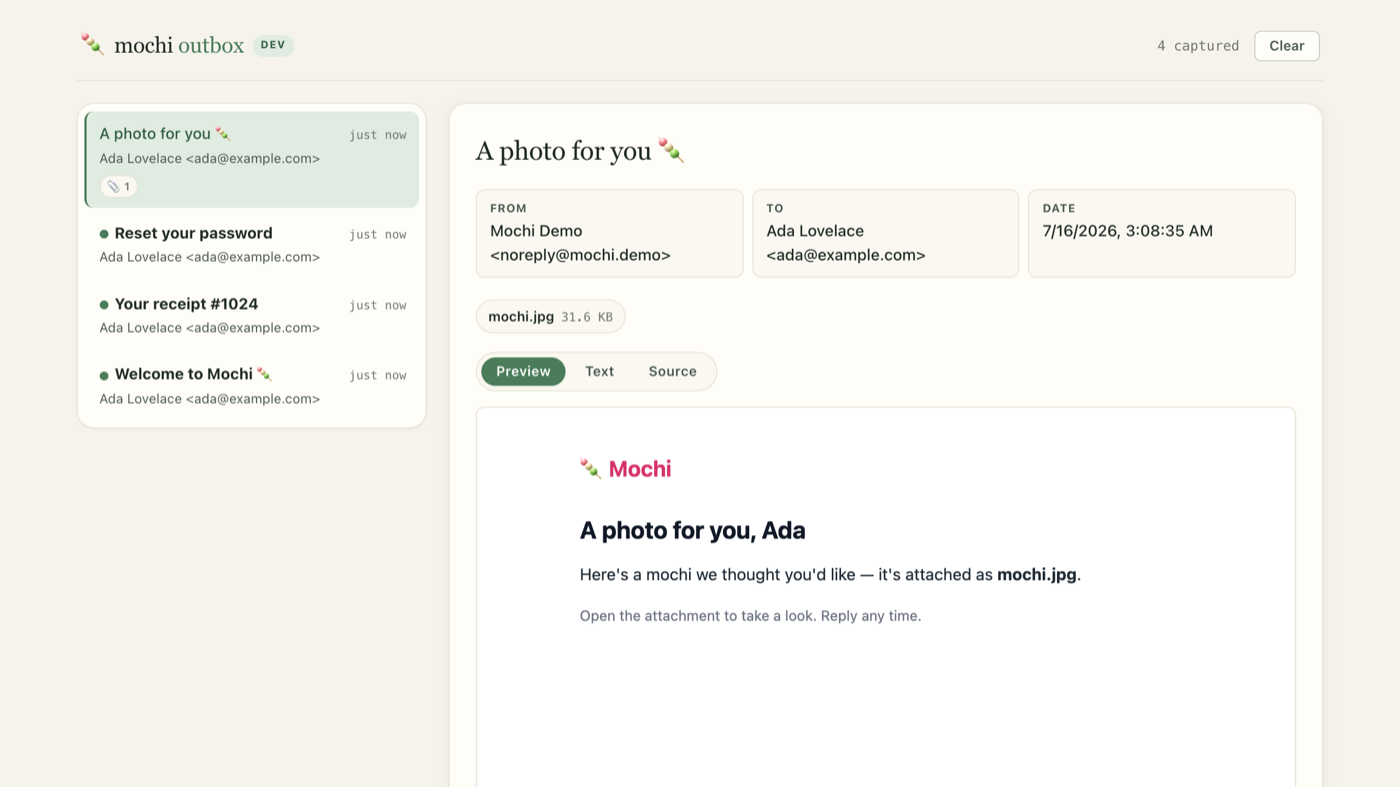
In development every message also lands in a development outbox, so you can read what your app just sent without any extra setup:
Queues
Use Mochi.queue() to easily defer work to the background and take it off the request path — for example sending email, encoding media or calling a slow API.
await Mochi.serve({
  routes,
  queues: {
    emails: Mochi.queue<{ to: string }>({
      concurrency: 10,
      process: async (job) => sendEmail(job.data.to),
    }),
  },
});

await Mochi.getQueue<{ to: string }>('emails').add('send', { to: 'alice@example.com' });
Form captcha
<MochiCaptcha /> is a simple CAPTCHA based on cryptographic proof-of-work — no third-party service or extra costs.
You’ll find a real example below:
The captcha demo covers the failure modes — replay, expiry, and a submit that never solved the slider.
Rate limiting
Any Mochi.page() or Mochi.api() route can now take a rateLimit config, allowing you to easily rate limit a route.
5 of 5 requests left this window.
'/api/data': Mochi.api(handler, {
  rateLimit: { limit: 100, window: '1m' },
}),
A skip callback decides per request whether to spend quota:
'/admin': Mochi.page('./src/admin/Admin.svelte', {
  rateLimit: {
    limit: 10,
    window: '15m',
    ban: { threshold: 3, duration: '1h' },
    skip: (req) => {
      const header = req.headers.get('Authorization');
      return !header || credentialsMatch(header);
    },
  },
}),
Client-only components
Some components can’t render on the server at all — canvas, localStorage, third-party browser SDKs. The new mochi:clientOnly directive emits an empty island wrapper during SSR and mounts the component in the browser, with optional fallback markup as children. There’s also a :visible variant that waits for the viewport.
<AudioVisualizer mochi:clientOnly />Debug bar improvements
The dev debug bar grew alongside the new features: an Images tab for inspecting every transform on the page, a Cache tab for watching cache reads and writes, and an email outbox indicator that lights up when your app sends mail.

Other improvements
- Logging — the severity each framework event lands on is now remappable per app via the
consoleLogger:levelfilter, so you can promote what you care about and demote what you don’t without moving the global level. - CLI — the
mochi-frameworkcommand line tool got its own reference page, coveringbuild,generate-keyandupdate-skill. - Performance — faster builds, quicker dev HMR, and smaller client bundles across the board.
- Package updates — dependencies across the monorepo bumped to their latest versions.
Looking ahead
This release was bigger than normal, and a lot of the groundwork was laid in preparation for adding further built-in primitives. Some of the features currently in the pipeline are native internationalization support, Mochi.http() (a lightweight wrapper around fetch with retries and caching) and Mochi.feature() (built-in A/B testing).
Preparation work on the future Integration API has also started. It’s inspired by the equivalent Astro API and lets external packages hook into the framework through the existing hooks and filters system.
Install or upgrade
New project:
bun create mochi@latest my-appExisting project — bump the dependency and restart the dev server:
bun add mochi-framework@latest   # or @0.8.0 to pin
bun run dev
If you code with an AI assistant, don’t forget to add or refresh the agent skill. Copy the line for the agent you use:
bunx mochi-framework update-skill              # claude-code (default)
bunx mochi-framework update-skill opencode
bunx mochi-framework update-skill antigravity  # alias: agy
bunx mochi-framework update-skill codex
The full changelog has everything else, including the performance work on builds and dev HMR. Mochi is still early and in alpha — if something breaks, Discord or a GitHub issue both work.